Cisco Unified Contact Center Enterprise (Unified CCE) products incorporate high availability features in all standard deployments. Every production deployment must include redundancy for the core Unified CCE components. The redundant components are designed to fail over automatically and recover without manual intervention. Your design can include more than that basic high availability capability. A successful Unified CCE deployment requires a team with experience in data and voice internetworking, system administration, and Unified CCE application design and configuration.
Each change to promote high availability comes at a cost. That cost can include more hardware, more software components, and more network bandwidth. Balance that cost against what you gain from the change. How critical is preventing disconnects during a failover scenario? Is it acceptable for customers to spend a few extra minutes on hold while part of the system recovers? Would the customer accept losing context for some calls during a failure? Can you invest in greater fault tolerance during the initial design to position the contact center for future scalability?
Data Network Design Considerations
Highly available contact center designs start with the network infrastructure for data, multimedia, and voice traffic. A single point of failure in your network infrastructure devalues any other high availability features that you design into the contact center. Begin from the PSTN and ensure that incoming calls have multiple paths for reaching Unified CVP for initial treatment and queuing.
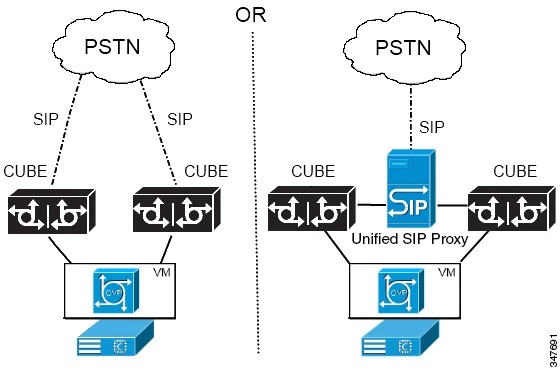
Ideally, design with at least two SIP trunks each connecting to a separate Cisco Unified Border Element (Cisco UBE). If any Cisco UBE or SIP trunk fails, the PSTN can route all traffic through the remaining SIP trunks. The PSTN route either by configuring all the SIP trunks as a large trunk group or by configuring rerouting or overflow routing to the other SIP trunks. You can also connect a redundant Cisco UBE to each SIP trunk to preserve capacity when a Cisco UBE fails and the SIP trunk is still functional.
In some areas, the PSTN does not provide multiple SIP trunks to a single site. In that case, you can connect the SIP trunk to a Cisco Unified SIP Proxy. Then, you could connect multiple Cisco UBEs to the Unified SIP Proxy to provide some redundancy.
The Cisco UBE passes calls to Unified CVP for initial treatment and queuing. Register each Cisco UBE with a separate Unified CVP for load balancing. For further fault tolerance, you can register each Cisco UBE with a different Unified CVP as a backup. If a Cisco UBE cannot connect with a Unified CVP, you can also use TCL scripts to provide some call processing. A TCL script might reroute the calls to another site or dialed number or play a locally stored .wav file to the caller and end the call.
Voice gateways using the Cisco Unified Survivable Remote Site Telephony (SRST) option for Unified Communications Manager follow a similar failover process. If the gateway is cut off from its controlling subscriber, the gateway fails over into SRST mode. The failover drops all voice calls and resets the gateway into SRST mode. Phones rehome to the local SRST gateway for local call control.
While running in SRST mode, Unified CCE operates as if the agents have no CTI connection from their desktops. The Unified CCE routing application detects the agents as not ready and sends no calls to these agents. When the gateway and subscriber reestablish their connection, the subscriber takes control of the gateway and phones again, allowing the agents to reconnect.
Public and Private Network Connections
Unified CCE components use a public network and a private network to communicate. These networks must be separate physical networks. For high availability, include redundant connections in your public network. Ideally, each connection uses a different carrier.
If QoS and bandwidth are configured correctly, your design can merge a public or private WAN link with other corporate traffic. If you use a link that merges non-contact-center traffic, keep the public and private traffic on different networks. However, never split private network traffic onto low-priority and high-priority data paths. The same link must carry all private network traffic for a given component. Sending low-priority and high-priority traffic on different links disables the component failover behavior. Similarly, all low- and high-priority traffic from each peripheral gateway to the low- and high-priority addresses of the call router must take the same path.
During a public network failure, you can temporarily fail over the public Unified Communications Manager traffic to the private network. Size the private network to accommodate the extra traffic. When the public traffic fails over to the private network, restore the public network as quickly as possible to return to normal operation. If the private network also fails, Unified CCE instability and data loss can occur, including the corruption of one Logger database.
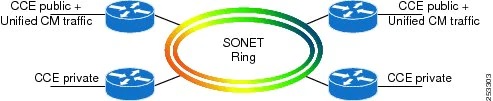
A SONET fiber ring is a highly resilient network with built-in redundancy. You can send the public and private traffic over the same SONET ring under normal operations or following a network failover. A separate link for the private traffic is not required in this case. Also, two routers are required on each side of the WAN for redundancy. Under normal operations, use one router for the Unified CCE public traffic and use the other router for the Unified CCE private traffic. The other rules described in this section also apply.